What you'll do
GRPCMicroService is a Java starter project demonstrating a simple gRPC Greeter service built with Micronaut. Follow this workflow from the extracted project folder to a successful Maven verification and a local run.
This is a getting-started guide, not a production deployment guide.
01Requirements
- JDK 21 installed and selected in your environment or IDE.
- Apache Maven installed and available on your terminal's
PATH, unless you use an IDE-provided Maven installation. - Internet access so Maven can download dependencies on the first build.
- Eclipse IDE with Maven project support (m2e), if you want to follow the IDE workflow. A terminal can also be used.
Check Java and Maven
java -version
mvn -versionConfirm that Java reports version 21 and Maven is using a compatible JDK.
02Import the project into Eclipse
- Extract the downloaded project ZIP into a folder you can find easily.
- Open Eclipse.
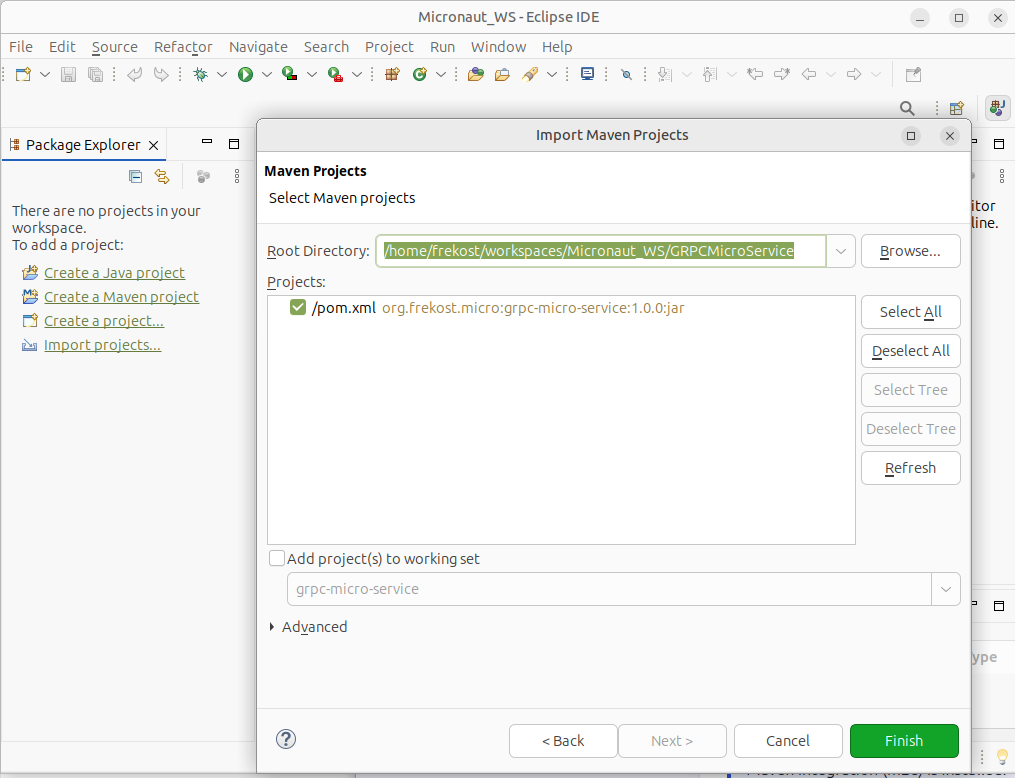
- Select File → Import… → Maven → Existing Maven Projects.
- Choose the extracted project folder as the root directory.
- Select the discovered
pom.xmlproject and finish the import. - Wait for Eclipse/Maven to resolve dependencies and finish background tasks.
03Verify everything with one command
Open a terminal in the directory that contains pom.xml.
mvn clean compile testThis command asks Maven to:
- clean previous build output;
- generate required sources from the Protocol Buffers definition using the configured Maven build;
- compile the project;
- run the configured tests and verification checks.
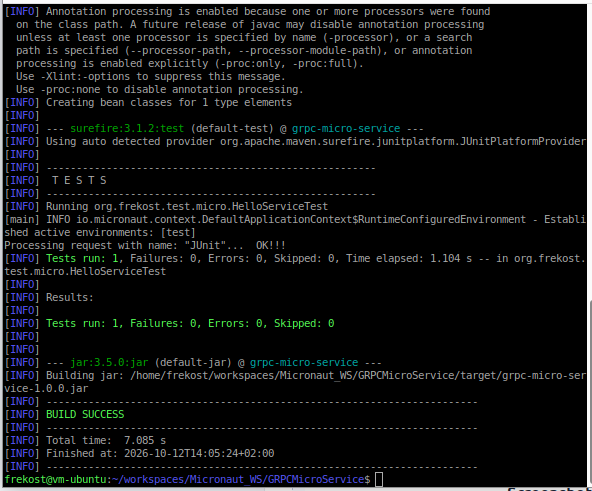
BUILD SUCCESS, confirming that the configured build and tests completed successfully in your environment.Important: mvn clean compile test verifies the project; it does not leave the application running. Start the application in the next step.
04Run the application from Eclipse
- In Project Explorer, locate
Application.javain the main Java source tree. - Right-click the file and choose Run As → Java Application.
- Watch the Console view for the server startup message and sample client output.
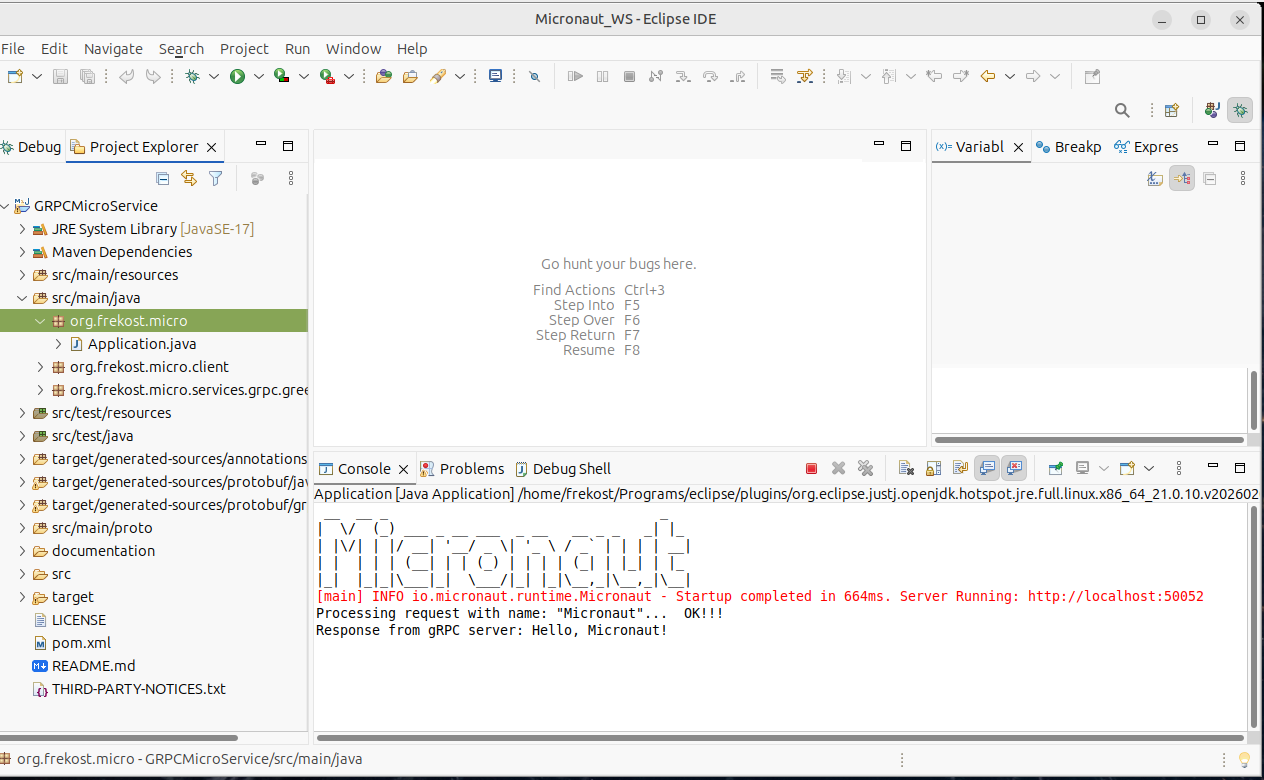
The sample configuration uses gRPC port 50052. The included client runner is scheduled to call the service after startup, so output should be similar to this (exact timing and log formatting may vary):
Processing request with name: "Micronaut"
Response from gRPC server: Hello, Micronaut!The request is handled by the Greeter service defined by the project's Protocol Buffers contract.
50052 is already in use, stop the other process or update the server port and matching client address consistently.05Quick troubleshooting
Maven cannot download dependencies
Check your internet connection, proxy settings and Maven repository access. Run mvn clean compile test again after resolving the issue.
The wrong Java version is used
Check java -version and mvn -version. In Eclipse, also review the project's JRE System Library and installed JRE settings.
Eclipse shows generated-source errors
Run mvn clean generate-sources from the directory containing pom.xml, then refresh the project and update Maven project configuration if needed.
Port 50052 is occupied
Stop the process using that port, or change the gRPC server port and the matching client address together.
The sample response does not appear
Check the Console for startup errors and verify that the client runner is enabled. Compare your output with the project's configuration and documentation.
What's included in GRPCMicroService?
- Micronaut application entry point and gRPC service implementation.
- Protocol Buffers service contract (
helloworld.proto). - Maven configuration for protobuf/gRPC source generation and build.
- Application configuration for the gRPC server and client channel.
- A sample client runner and a test for the greeting service.
- Project documentation and troubleshooting notes.
Ready to explore?
This free guide explains the basic workflow. Use the project's README and documentation for more detail about its structure and configuration.
Visit the Frekost project page on GitHub
Scope: This starter is intended for learning and adaptation. A successful local build is not, by itself, a production-readiness or security certification.